HTTP QUERY Method: The New HTTP Standard That Solves the GET vs POST Dilemma
Introduction
If you’ve ever built a REST API, you’ve probably faced a common problem.
You need to fetch data based on complex search filters. Maybe users can filter products by category, price, brand, availability, ratings, and dozens of other options. Suddenly, your clean URL becomes a long string of query parameters that is difficult to read, maintain, and sometimes even exceeds practical URL limits.
Many developers solve this by switching to a POST request. While POST accepts a request body, it wasn’t designed for read-only operations. This creates confusion for caches, proxies, and even other developers reading your API.
The HTTP QUERY method finally addresses this long-standing issue.
Standardized by the IETF in RFC 10008, QUERY provides a safe, idempotent request that accepts a request body, giving developers the best features of both GET and POST.
What is the HTTP QUERY Method?
The HTTP QUERY method is a new HTTP request method designed specifically for read-only operations that require complex request data.
Think of it as:
- The safety of GET
- The request body of POST
- The semantics developers have wanted for years
Unlike POST, a QUERY request does not modify server data. Instead, it simply asks the server to process the supplied query and return matching results.
Why Was QUERY Introduced?
GET requests work well for simple searches.
Example:
GET /products?category=laptop&brand=apple
But what happens when the search includes:
- Multiple categories
- Nested filters
- Date ranges
- Complex sorting
- Hundreds of selected IDs
The URL quickly becomes difficult to manage.
Many APIs switched to:
POST /products/search
with a JSON body:
{
  "category": ["Laptop", "Tablet"],
  "price": {
    "min": 500,
    "max": 3000
  },
  "brand": ["Apple", "Dell"],
  "inStock": true
}
While this works technically, POST implies that the request may change server state, even when it doesn’t.
QUERY solves this mismatch by allowing a request body while remaining explicitly safe and idempotent.
How QUERY Works
A QUERY request looks very similar to POST.
Example:
QUERY /products HTTP/1.1
Host: api.example.com
Content-Type: application/json

{
  "category": "Laptop",
  "brand": "Dell",
  "price": {
    "min": 800,
    "max": 2000
  },
  "sort": "price"
}
The server processes the JSON payload and returns matching products without modifying any stored data.
GET vs POST vs QUERY
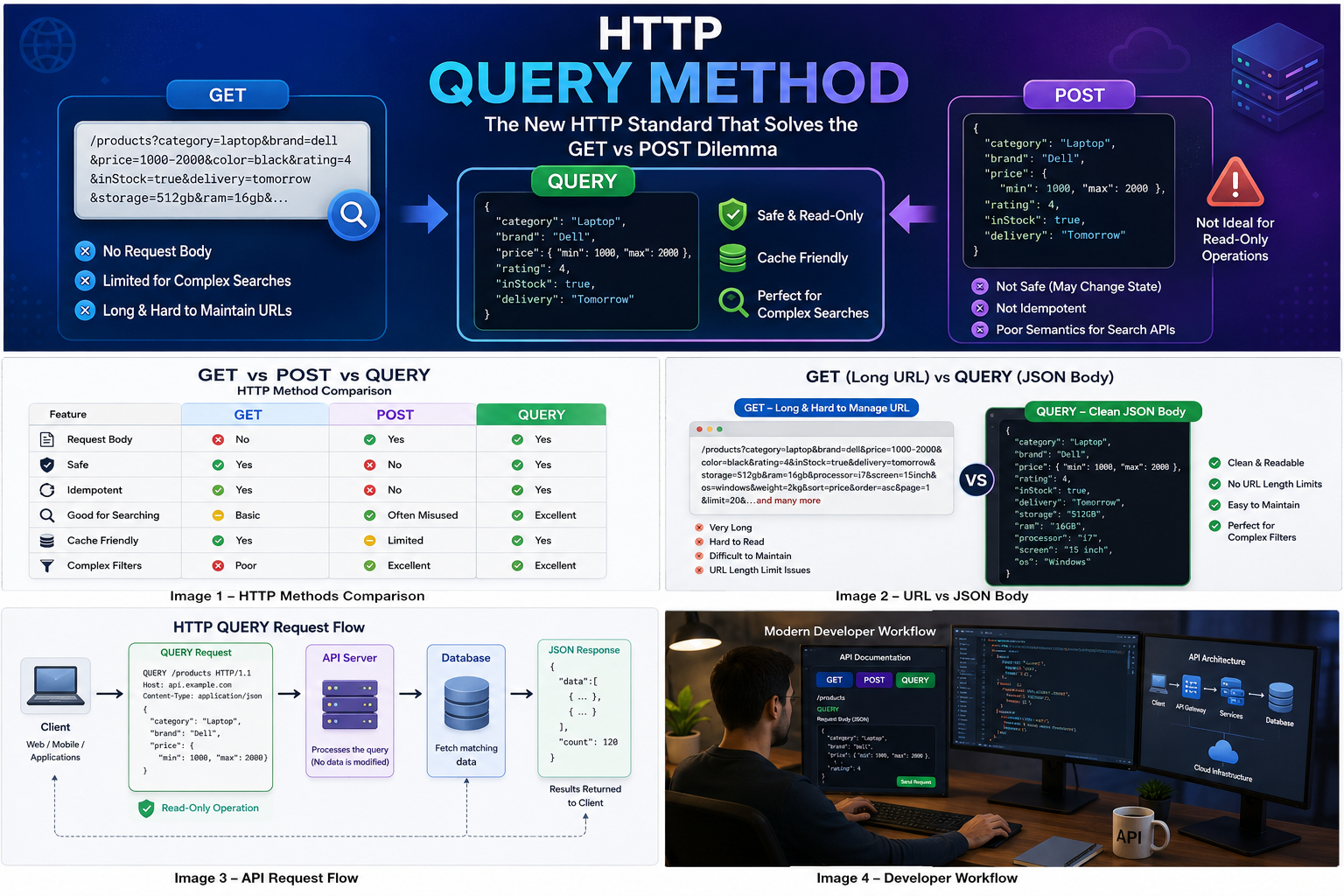
| Feature | GET | POST | QUERY |
|---|---|---|---|
| Request Body | No | Yes | Yes |
| Safe | Yes | No | Yes |
| Idempotent | Yes | No | Yes |
| Good for Searching | Basic | Often Misused | Excellent |
| Cache Friendly | Yes | Limited | Yes |
| Complex Filters | Poor | Excellent | Excellent |
This comparison reflects the design goals of RFC 10008, which introduces QUERY as a safe and idempotent method with a request body.
Real-World Example
Imagine building an online shopping platform.
Customers want to search by:
- Category
- Brand
- Price
- Rating
- Discount
- Delivery Time
- Color
- Storage Capacity
Using GET:
GET /products?category=laptop&brand=dell&price=1000-2000&color=black&rating=4
Now imagine there are 30 filters.
The URL becomes enormous.
Using QUERY:
QUERY /products
{
  "category": "Laptop",
  "brand": "Dell",
  "price": {
    "min": 1000,
    "max": 2000
  },
  "rating": 4,
  "color": "Black",
  "delivery": "Tomorrow"
}
The request stays clean, readable, and scalable.
Benefits of the QUERY Method
Cleaner APIs
Complex search criteria remain inside a structured JSON body instead of a long URL.
Safe Operations
Servers know that QUERY requests should never modify data.
Better Caching
Because QUERY is defined as safe and idempotent, intermediaries can support caching and automatic retries where appropriate.
Improved Readability
Developers can understand large search payloads more easily than encoded query strings.
Future-Proof Design
Modern APIs increasingly rely on structured search payloads, making QUERY a natural fit.
Current Adoption Status
Although QUERY is now an official HTTP standard (RFC 10008), adoption across browsers, API gateways, proxies, frameworks, and cloud platforms is still in its early stages. Many existing systems only recognize the traditional HTTP methods, so developers should verify infrastructure support before using QUERY in production.
For now, most APIs continue to use POST for complex searches because it is universally supported.
When Should You Use QUERY?
QUERY is a great choice when:
- You are retrieving data only.
- The request requires a large or complex payload.
- You want read-only semantics.
- You need safe retries and cache-friendly behavior.
- Your infrastructure supports the QUERY method.
Avoid QUERY when:
- Creating new records
- Updating resources
- Deleting data
- Triggering actions that change server state
Those operations should continue using POST, PUT, PATCH, or DELETE.
Conclusion
The introduction of the HTTP QUERY method marks one of the most meaningful additions to HTTP in years. It finally provides a standard solution for complex, read-only queries that don’t fit neatly into GET URLs and shouldn’t misuse POST.
While widespread adoption will take time, QUERY offers a cleaner, more expressive way to design modern APIs. As frameworks and infrastructure begin supporting it, developers will have a standardized option that aligns with HTTP semantics while keeping complex searches simple and maintainable.
If you’re designing the next generation of APIs, the HTTP QUERY method is definitely worth watching.
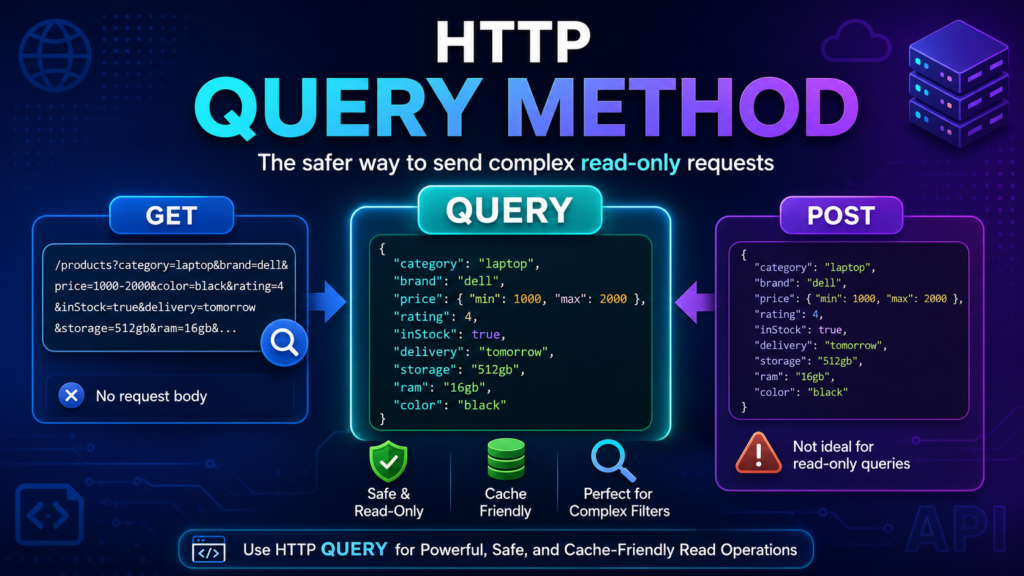
Blog Image (Featured Image)
Prompt:
Modern illustration showing the HTTP QUERY method between GET and POST. Split-screen design with GET on the left (URL with long query string), POST on the right (JSON body with warning icon indicating state changes), and QUERY in the center (JSON request body with green shield, cache icon, and search icon). Clean blue and purple gradient background with modern API, cloud, and server illustrations. Flat vector style, high resolution.
In-Details Images
Image 1 – HTTP Methods Comparison
Prompt:
Infographic comparing GET, POST, and QUERY methods with icons representing safety, idempotency, request body support, caching, and API searches.
Image 2 – URL vs JSON Body
Prompt:
Side-by-side illustration showing a long GET URL filled with query parameters versus a clean JSON body using the HTTP QUERY method.
Image 3 – API Request Flow
Prompt:
Diagram showing Client → QUERY Request → API Server → Database → JSON Response. Highlight that QUERY performs read-only operations without changing server data.
Image 4 – Developer Workflow
Prompt:
Modern software developer working with API documentation, HTTP methods (GET, POST, QUERY), JSON requests, cloud servers, and code editor on multiple monitors in a clean workspace.
Comments
No comments yet. Be the first to comment.